
 Many organizations have excellent procedures and checklists. The problem isn’t the quality of the procedures – the problem is they get forgotten.
You may, for example, have decided to audit internally every six months, evaluate suppliers annually and inspect fire safety weekly. These frequencies are examples, not general ISO requirements. But when daily operations take over, these critical tasks fall by the wayside, until the auditor points out the gaps.
The solution isn’t more calendar reminders. The solution is building recurring procedures directly into your management system.
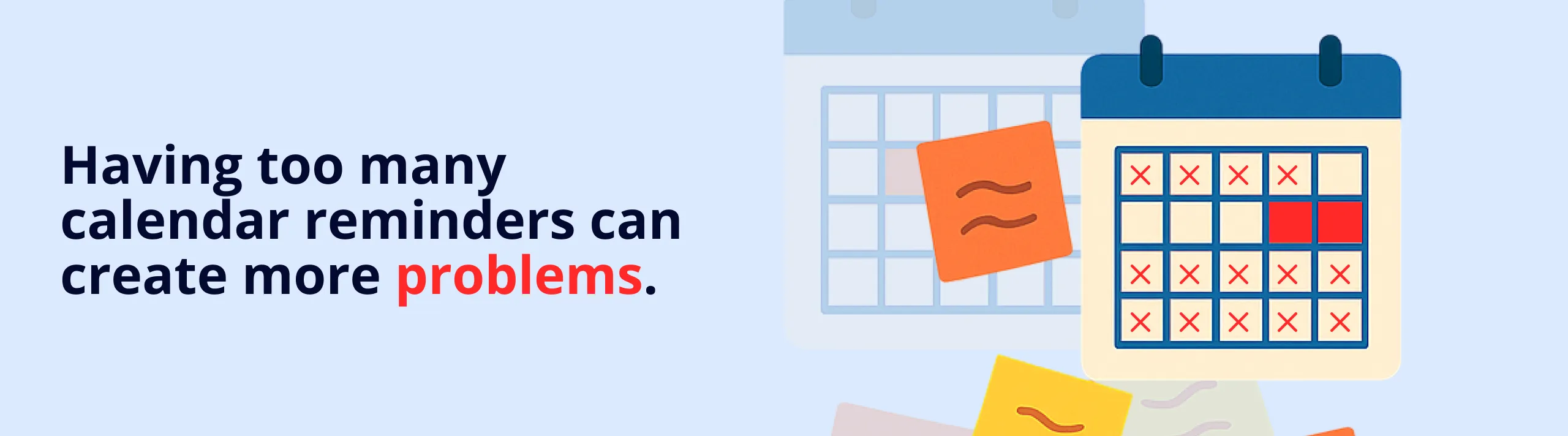
Why Static Checklists Aren’t Enough
Most management systems contain checklists. You have a checklist for internal audits, one for supplier evaluation, one for month-end closing. But the checklists just sit there – they do nothing until someone remembers to use them.
The result:
- Audits are conducted irregularly
- Some suppliers are evaluated annually, others are forgotten for three years
- Safety checks are performed when “someone thinks about it”
- Management lacks oversight of what’s actually being done ISO 9001 distinguishes between tracking results and examining how the management system works. Clause 9.1 means you need to decide when to take measurements and when someone will assess the results. A saved series of measurements that nobody analyses is not enough. Clause 9.2 means internal audits need a planned approach rather than happening only when an external audit is approaching. Recurring checklists can support planning and records; you still need to take responsibility for the content and assessments.
What Are Recurring Checklists?
A recurring checklist is a template that automatically creates new checklists according to a schedule you define.
Instead of:
-
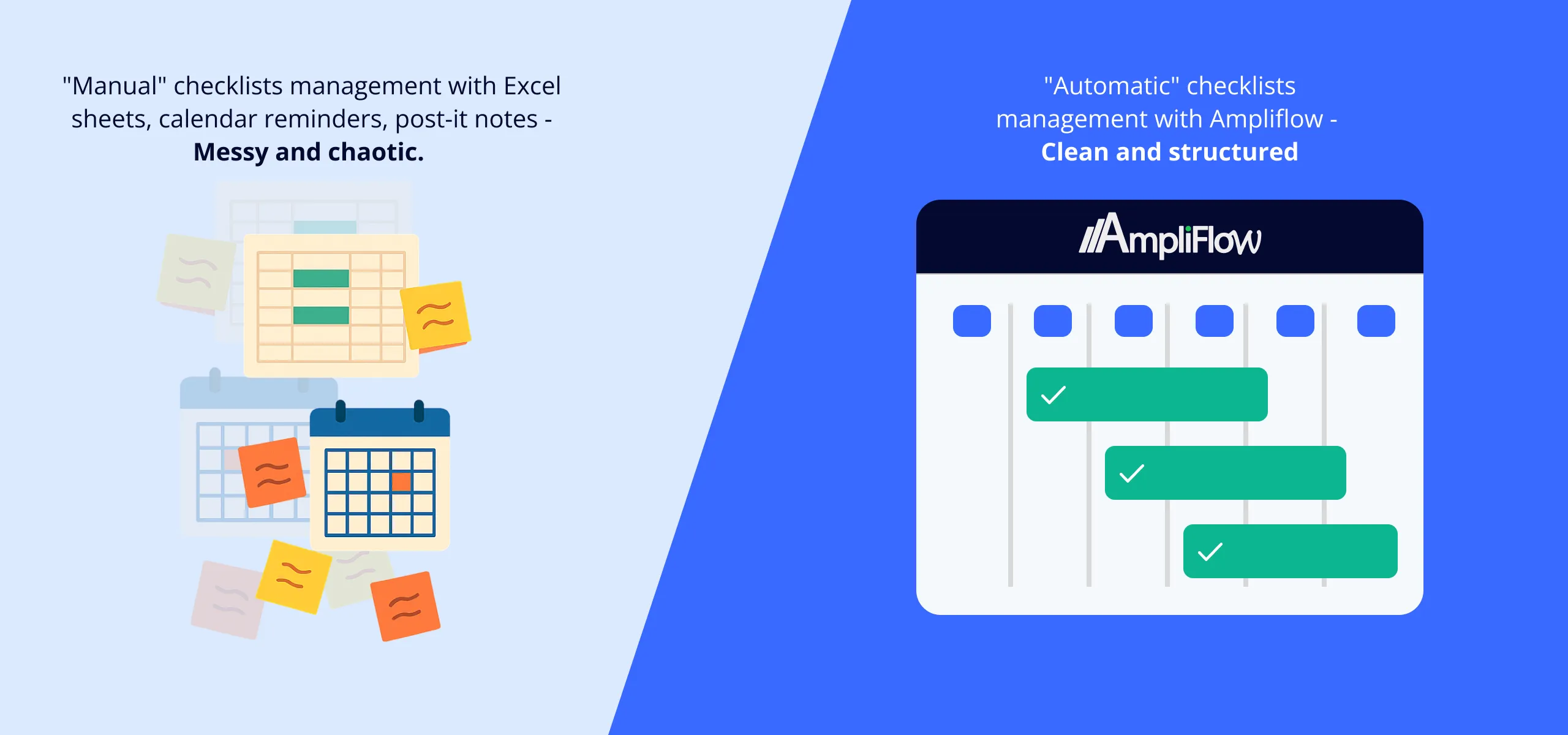
Creating manual calendar reminders
-
Copying the previous checklist each time
-
Remembering who’s responsible this time
-
Keeping track of which checks are overdue You get:
-
New checklists created automatically at the right time
-
Responsible person assigned directly
-
Visual overview of upcoming and completed checks
-
History showing you follow your procedures
Three Types of Recurring Schedules
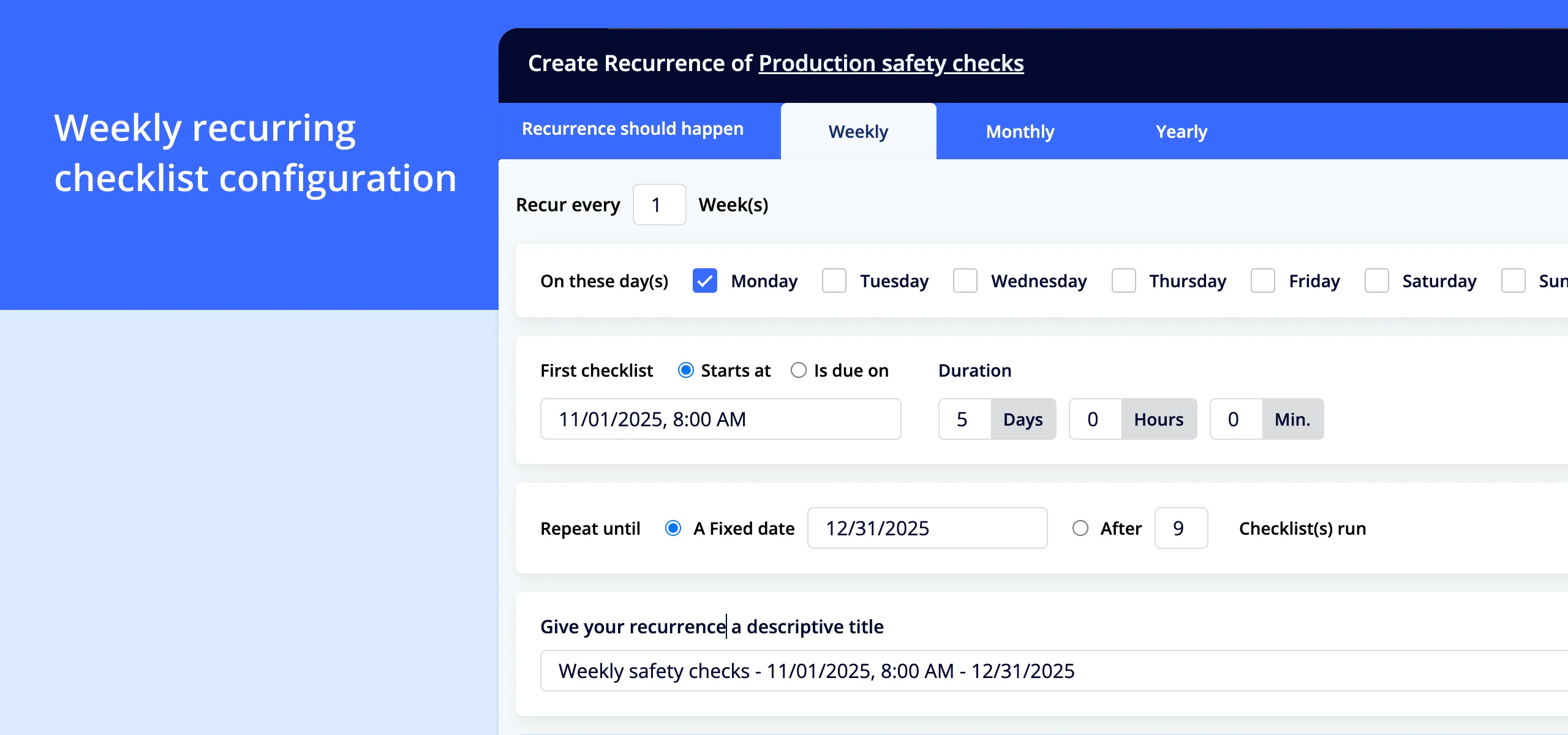
Weekly Checklists
Suitable for procedures that must occur regularly at short intervals.
Examples:
-
Fire safety inspections (every Monday)
-
Cleaning checks in production areas (every Friday)
-
Safety procedure checks (every Tuesday at 10am) How it works:
-
Select which day of the week the check should occur
-
Set interval (every week, every other week, every third week)
-
Enter start date and optional end date
-
System creates new checklists automatically **Real-world example:**A mid-sized European manufacturing company uses weekly checklists for production safety checks. Every Monday at 08:00, a new checklist is created that the production manager must complete by Friday. If the check hasn’t been completed by Thursday, a reminder is sent.
Monthly Checklists
Suitable for procedures that should occur monthly or on specific days each month.
Examples:
-
Month-end closing and reconciliations (last business day of each month)
-
Shelf-life checks of inventory products (15th of each month)
-
Monthly meeting about non-conformities (first Friday of each month) How it works:
-
Select day of the month (e.g., the 15th, last business day, first Monday)
-
Set interval (every month, every other month, quarterly)
-
Enter start date and optional end date
-
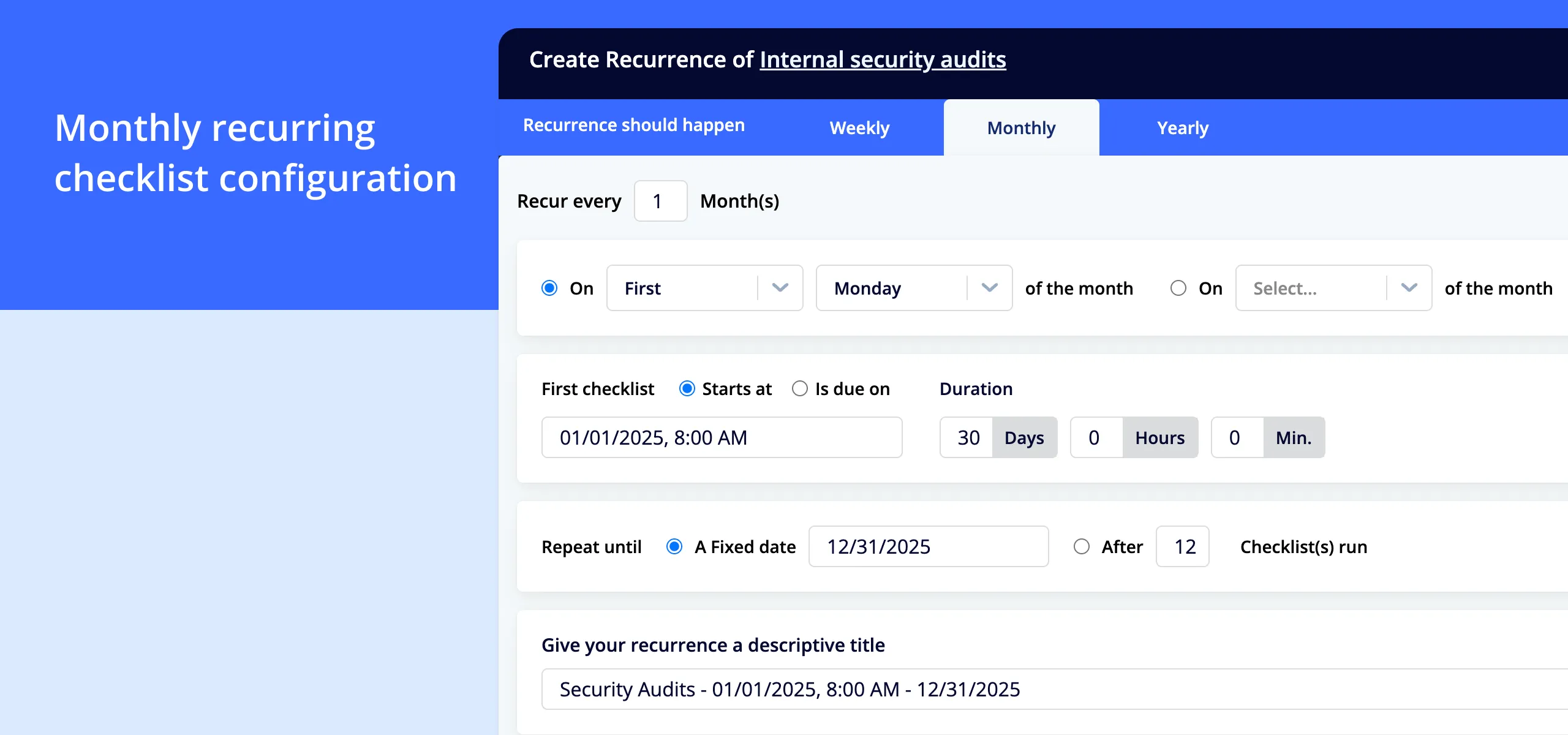
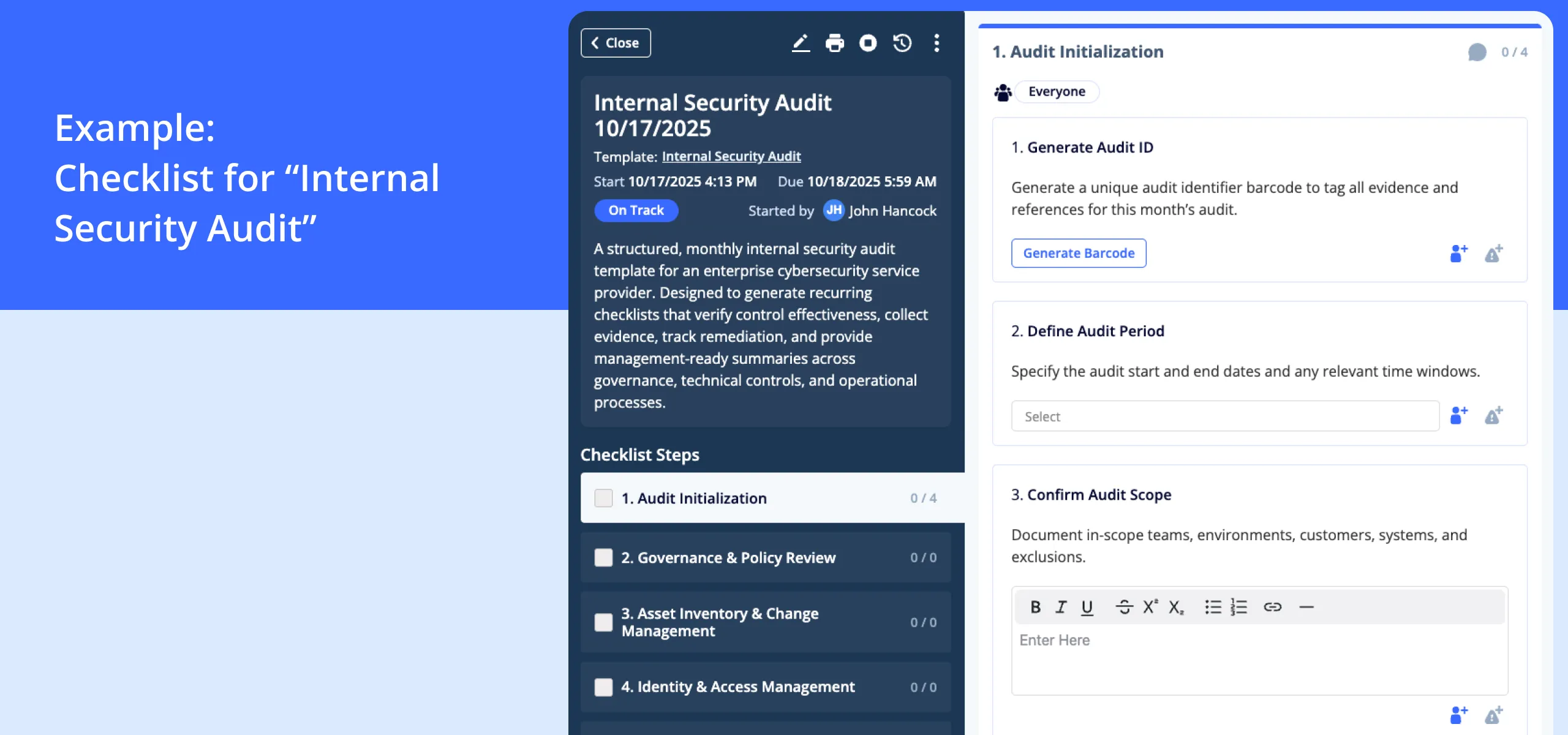
System creates new checklists automatically **Real-world example:**An IT consulting firm in Northern Europe uses monthly checklists for internal security audits. The first Monday of each month, a new checklist is created that the IT manager must complete. The history shows they’ve conducted 24 consecutive audits without missing a single one – something their ISO 27001 auditor noted very positively.
Annual Checklists
Suitable for procedures that should occur annually or at specific times of the year.
Examples:
-
Supplier evaluations (every year in January)
-
Risk analysis updates (annually in September)
-
Measurement equipment calibration (annually, different dates for different equipment) How it works:
-
Select month and day (e.g., January 15, last Friday in September)
-
Set interval (every year, every other year)
-
Enter start date
-
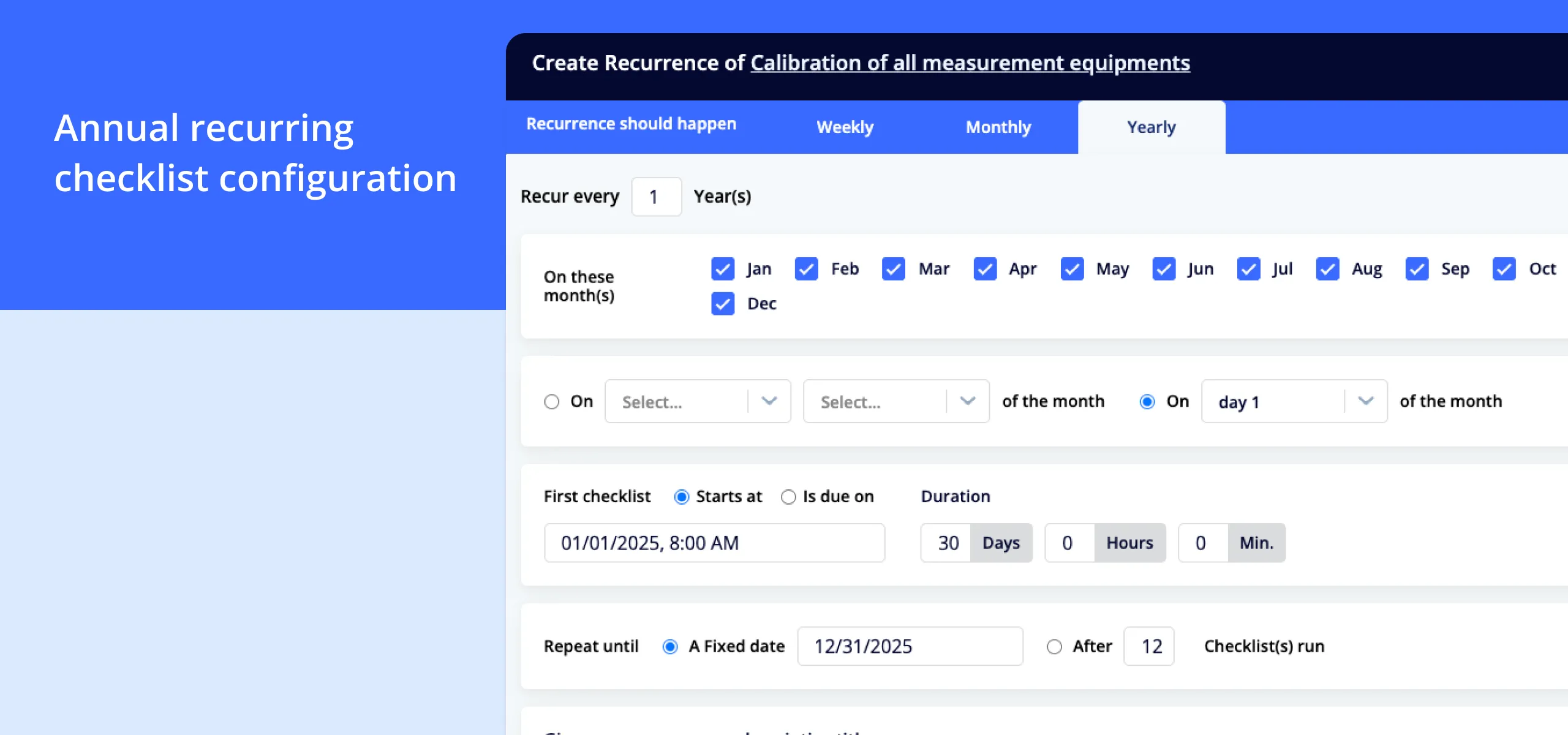
System creates new checklists automatically **Real-world example:**A laboratory company uses annual checklists for calibration of all measurement equipment. Each instrument has its own recurring checklist that’s automatically created 30 days before the calibration date. The responsible technician receives a task, performs the calibration, documents the result – and next year’s checklist is automatically created.
How to Get Started
Step 1: Identify Recurring Activities
Review your management system and identify all activities that should occur regularly.
Questions to ask:
-
Which activities need scheduling based on your requirements?
-
Which procedures are forgotten today?
-
Which activities create stress because you don’t have control over when they should be done?
-
Which documentation does the auditor require to be regular? Common candidates:
-
Internal audits (ISO 9001, 14001, 27001, 45001 all require this)
-
Supplier evaluations
-
Risk analyses and risk assessments
-
Safety checks
-
Environmental inspections
-
Fire safety inspections
-
Measurement equipment checks
-
Competence matrix updates
-
Management review (different parts can be broken out)
Step 2: Choose the Right Frequency
For each activity, determine how often it should occur.
For internal audits under ISO 9001 clause 9.2 and ISO 27001 clause 9.2, you need to plan how often reviews will take place. Those clauses do not prescribe one number of months for every organisation. The importance of processes and previous audit findings inform the programme. A recurring problem may justify reviewing an area more often than a stable one.
ISO 14001 clause 9.1.1 also means deciding when to take environmental measurements and evaluate the results. Distinguish the measurement date from the meeting where you decide what the result means.
Our advice is to choose frequencies based on how quickly a problem can develop and what you need to detect. The following are examples to discuss, not standard requirements:
- Critical safety procedures: Weekly or daily
- Quality controls: Monthly or quarterly
- Strategic follow-up: Quarterly or annually Tip: Start conservatively. Better six activities that work perfectly than twenty activities where half are ignored. You can always add more later.
Step 3: Create Templates
For each recurring activity you need a template – a checklist that describes exactly what should be done.
A good template contains:
- Clear name (e.g., “Internal Audit – Quality Management System”)
- Concrete steps to follow
- Who’s responsible
- What should be documented
- Acceptance criteria (what’s OK, what’s a non-conformity?) Example template for internal audit:
Internal Audit – Non-conformity Management
-
Review non-conformity register- Are all non-conformities from the last 6 months registered?
-
Are all non-conformities assigned to a responsible person?
-
Check action plans- Do all non-conformities have an action plan?
-
Are the action plans realistic?
-
Verify completed actions- Were actions completed on time?
-
Has the effect of actions been verified?
-
Interview responsible persons- Do they understand the process?
-
Does the tool work for them?
-
Document results- Summarize findings
-
Identify improvement areas
-
Create non-conformity if serious issues
Tip: Use existing checklists as a starting point. Improve them based on previous experience.
Step 4: Configure Recurring Schedule
In AmpliFlow, you create a recurring schedule by:
-
Select template (the checklist to be repeated)
-
Select frequency (weekly/monthly/annual)
-
Enter details:- Weekly: Which day of the week? Every week or with interval?
-
Monthly: Which day of the month? Every month or with interval?
-
Annual: Which month and day?
-
Enter start date
-
Enter optional end date (if the activity should stop at a certain time)
-
Select responsible person or team
-
Preview timeline (see when checklists will be created)
-
Activate schedule The system then automatically creates:
-
New checklists at the right time
-
Assignment to the right person
-
Reminders when deadlines approach
-
History of completed checks
Step 5: Use Visual Timeline
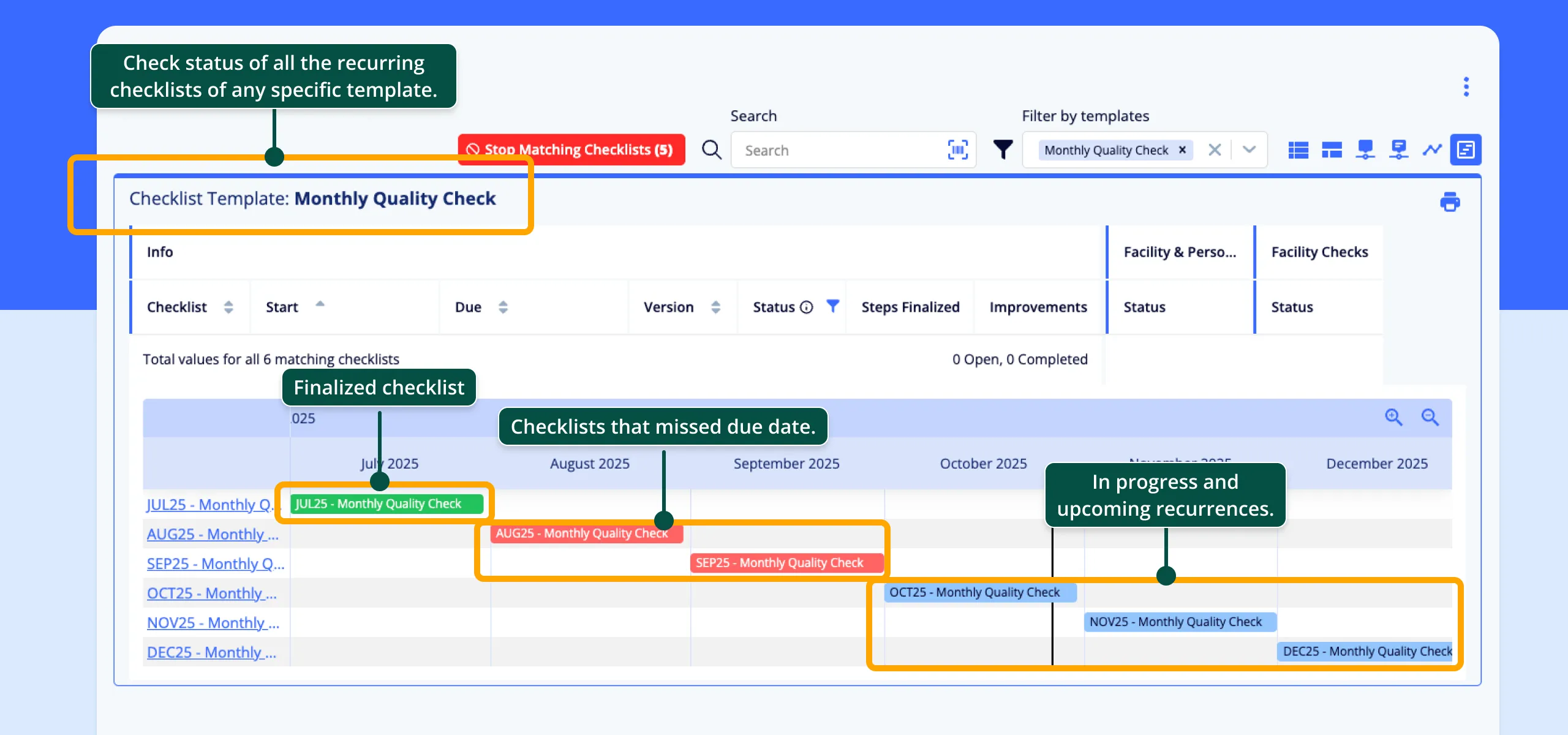
A unique feature in AmpliFlow is the visual timeline for recurring checklists.
The timeline shows:
-
Future checklists: What will be created next week, month, quarter
-
Active checklists: What’s ongoing right now
-
Completed checklists: History proving continuity
-
Overdue checklists: What’s been missed Why this is valuable:
-
Management can immediately see if procedures are being followed
-
During audits you can demonstrate systematic work over time
-
The team sees what’s coming and can plan
-
Patterns become visible (e.g., certain weeks are overloaded) **Practical example:**A food & beverage company had 12 different recurring checks. In the first month they noticed that week 3 of each month had 5 different checklists – the production team couldn’t manage. They adjusted the schedules so checks were spread more evenly throughout the month. Result: 100% completion rate instead of 73%.
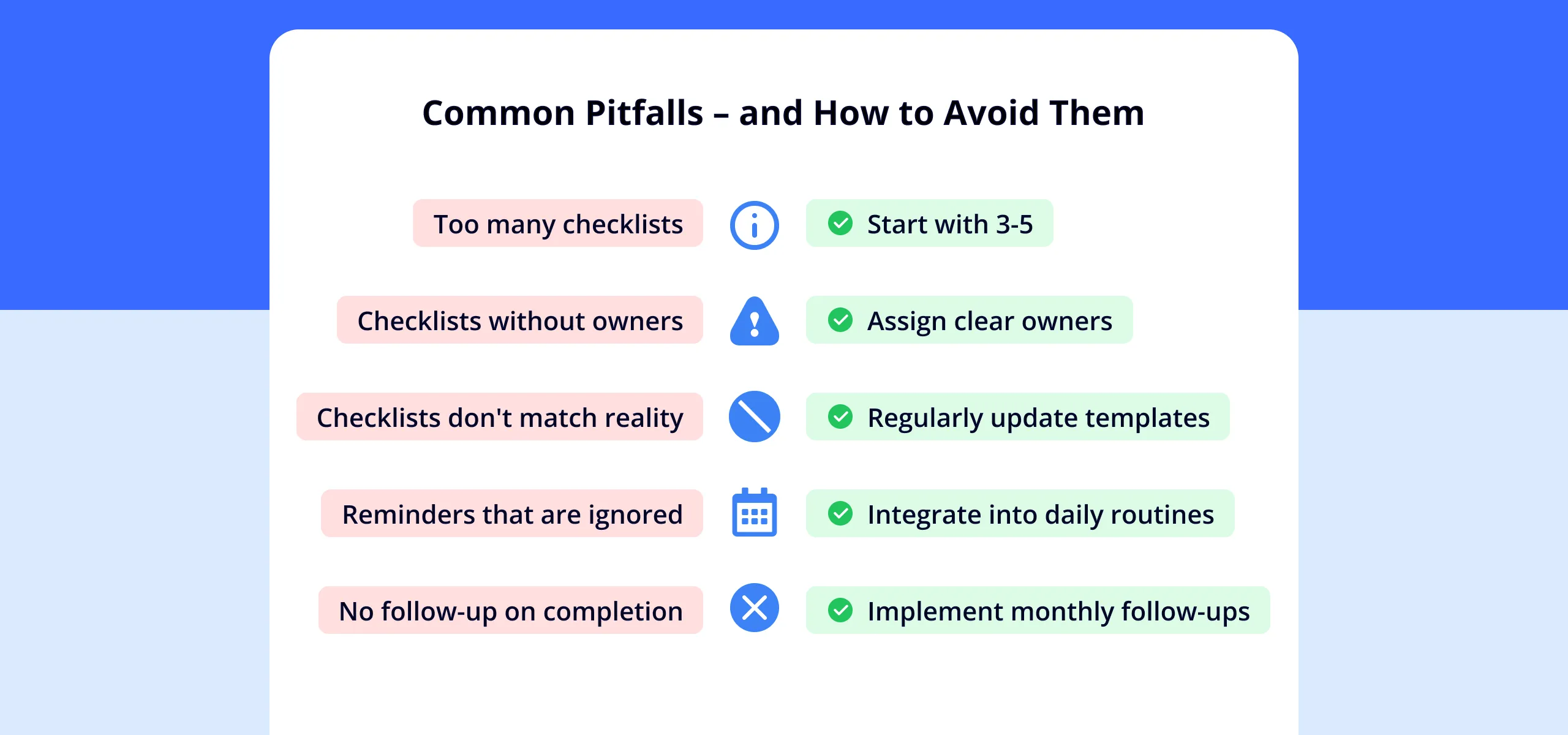
Common Pitfalls – and How to Avoid Them
Pitfall 1: Too Many Checklists at Once
The mistake: The organization creates 20 recurring checklists in the first week. The team is flooded with tasks and ignores half.
The solution: Start with 3-5 critical procedures. When these work smoothly, add more. Quality over quantity.
Pitfall 2: Checklists Without Owners
The mistake: A checklist is created automatically but no one knows who should complete it.
The solution: Each recurring schedule must have a clear responsible person (individual or team). This person can delegate specific checklists, but responsibility is clear.
Pitfall 3: Checklists That Don’t Match Reality
The mistake: The checklist contains 30 steps that took 2 hours five years ago. Today the same check takes 20 minutes and some steps are irrelevant.
The solution: Review templates regularly. When a checklist is completed and something feels wrong – update the template immediately. Next time will be better.
Pitfall 4: Reminders That Are Ignored
The mistake: The system sends reminders, but they drown in all other emails and notifications.
The solution: Discuss checklists at the weekly meeting. Example: Monday meetings always start with “Which checklists do we have this week?”. Or: Production manager’s daily routine includes checking active checklists.
Pitfall 5: No Follow-up on Checklist Completion
The mistake: Checklists are created automatically, but no one follows up on whether they’re completed.
The solution: Management should have a monthly routine (which itself can be a recurring checklist!) where they review:
- Which checklists were completed on time?
- Which are overdue?
- What patterns do we see?
- Does anything need adjustment?
Real Results from Organizations
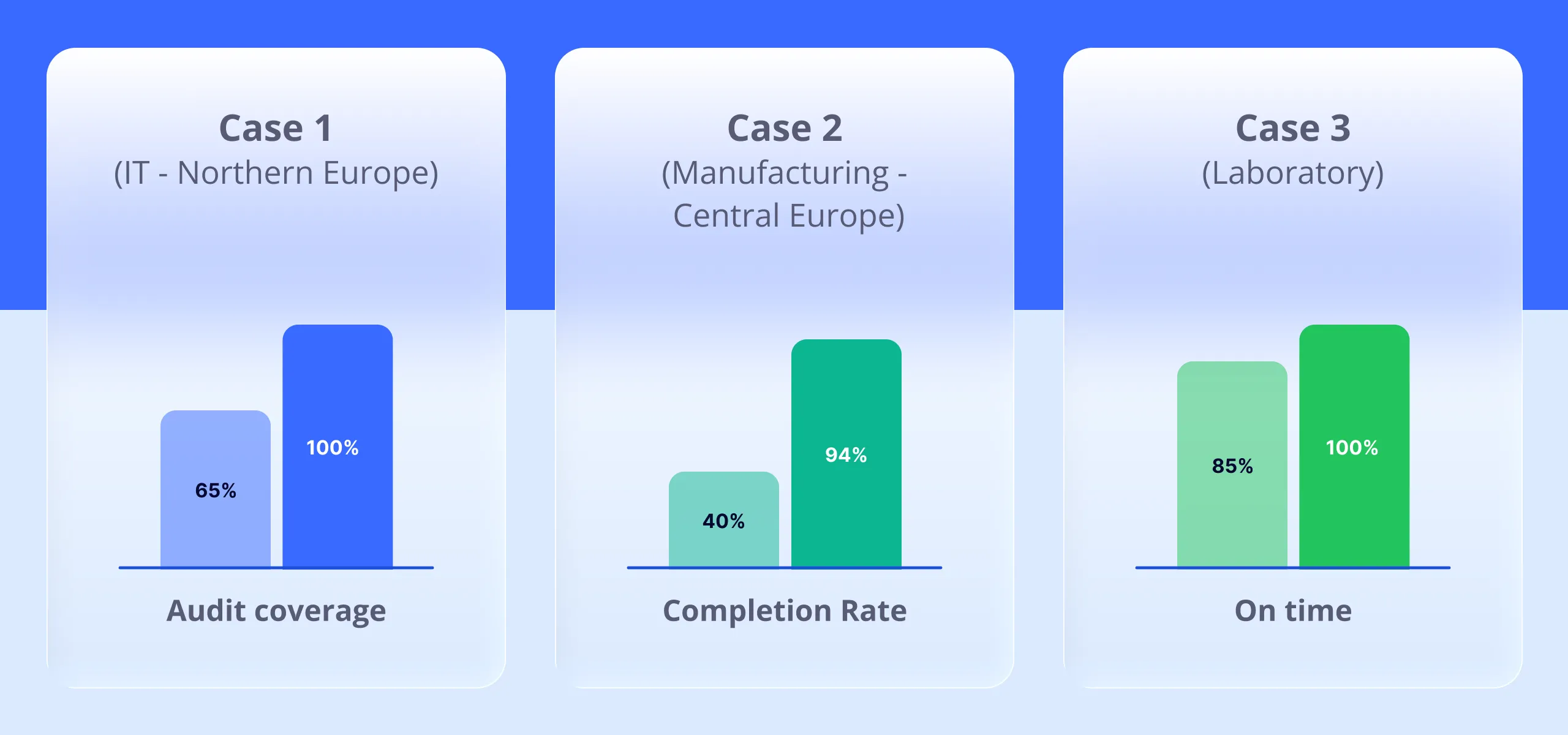
Case 1: IT Consulting Firm in Northern Europe (ISO 27001)
Situation: The company had ISO 27001 certification but struggled to keep internal security audits regular. Some areas were never audited, others too often.
Solution: Created 12 recurring monthly checklists – one for each area in the management system. The first Monday of each month, the audit rotated to the next area.
Results:
- 100% coverage of all areas over 12 months
- Even workload (approximately 3 hours per month instead of 40 hours once per year)
- Non-conformities detected faster because each area is audited more frequently
- External audit became easier – clear documentation of systematic work
Case 2: Manufacturing Company in Central Europe (ISO 9001 + ISO 14001)
Situation: The company had 15 different safety and environmental checks that should occur regularly. In practice, 40% of them were completed.
Solution: Mapped all checks, created clear templates, established recurring schedules (5 weekly, 7 monthly, 3 annual).
Results:
- Completion rate increased from 40% to 94% in six months
- Two environmental incidents detected in time before they became serious
- During recertification, the auditor noted “exemplary systematic approach”
- The CEO can now immediately see if all checks are completed – previously had no idea
Case 3: Laboratory Company (ISO 17025)
Situation: The company had 50+ instruments that all required annual calibration. They regularly missed deadlines and received non-conformities during accreditation.
Solution: Created a recurring annual checklist for each instrument with different dates. Checklists are created 30 days before calibration deadline.
Results:
- From 85% on time to 100% on time
- Technicians receive reasonable notice and can plan their work
- No non-conformities in the latest accreditation
- Automatic history shows all instruments are calibrated according to schedule
Planning Recurring Checks
Recurring checklists can help you schedule internal audits, environmental checks, security audits, and safety checks, and keep a history of completed checks.
Get Started Today
Here’s a concrete 30-day plan to implement recurring checklists:
Week 1: Mapping
- List all activities that should occur regularly in your management system
- Prioritize: Which three are absolutely most important?
- Identify responsible persons for these three
Week 2: Templates
- Create checklist templates for the three prioritized activities
- Test the templates: Complete each activity once according to the template
- Adjust templates based on experience
Week 3: Scheduling
- Create recurring schedules for the three activities
- Preview timeline
- Adjust frequency if it looks too dense or sparse
- Activate schedules
Week 4: Follow-up and Expansion
-
Follow up: Were the first checklists completed?
-
Adjust as needed
-
Identify next 3 activities to add After 90 days you should have:
-
6-10 recurring procedures working smoothly
-
Clear documentation of completed checks
-
Better overview of management system status
-
Less stress about “forgotten” procedures
Summary
Recurring checklists solve a fundamental problem in management systems: Procedures and checks get forgotten.
What recurring checklists give you:
-
Automatic creation of checklists at the right time
-
Visual overview of upcoming, ongoing and completed checks
-
Systematic documentation meeting ISO requirements
-
Fewer missed deadlines and forgotten procedures
-
Management that can follow up that procedures are actually completed Start simple:
-
Identify 3-5 critical recurring activities
-
Create clear checklist templates
-
Configure recurring schedules
-
Follow up and adjust
-
Expand to more activities The goal isn’t to digitize everything at once. The goal is to create a management system that actually lives – where procedures are completed regularly, not just when someone remembers them.
How AmpliFlow Can Help You
AmpliFlow has built-in support for recurring checklists with:
- Three types of schedules: Weekly, monthly, annual
- Visual timeline: See future and completed checklists graphically
- Automatic generation: New checklists created at the right time
- Flexible scheduling: Pause or archive schedules as needed
- Complete history: Documentation showing systematic work over time Contact us to see how recurring checklists can work in your management system.
Sources:
- ISO. (2015). ISO 9001:2015 - Quality management systems - Requirements. Retrieved from https://www.iso.org/standard/62085.html